Charts and strategies
AOC Traders Community: Shared Option Strategies
The AOC Traders Community is the social part of AOC: a feed of posts and option strategies shared by other traders, which you can follow, react to, comment on and fork. Most people come here to see what others are running on NIFTY or BANKNIFTY, argue about setups under a #tag, and post their own strategies with live P&L.
On this page
Where is the community and do I need an account?
Open AOC Traders Community from the side menu, or go to /aoc-traders-community. Shared strategies have their own feed at /strategies.
You can read the public feeds and posts without logging in. Posting, reacting, commenting, following and the Home and Following feeds need an account. Posting or commenting for the first time asks you to pick a community username. Posts and shared P&L are the authors' own views and numbers, not investment advice from AOC.
What are the community feeds?
Click a #tag in any post, such as #NIFTY, to see only posts with that tag. The tag chip at the top clears the filter.
- Home: your posts and posts from people you follow. Signed-in members land here.
- Latest: every post, newest first. Signed-out visitors land here.
- Top: posts ranked by their reactions.
- Strategies: only posts about strategies published to the community.
How do I post in the community?
To share a strategy instead, publish it from the Strategy Portfolio. Each published strategy gets its own post in the feed automatically.
- Log in and open the community.
- Type in What's on your mind? at the top of the feed. Posts can be up to 2,000 characters.
- Use @ to mention a trader and # to tag a symbol, for example #BANKNIFTY.
- Add up to 4 images (JPEG, PNG, WebP or GIF) with the image button if you want to show a chart.
- Post it. It shows at the top of your feed straight away.
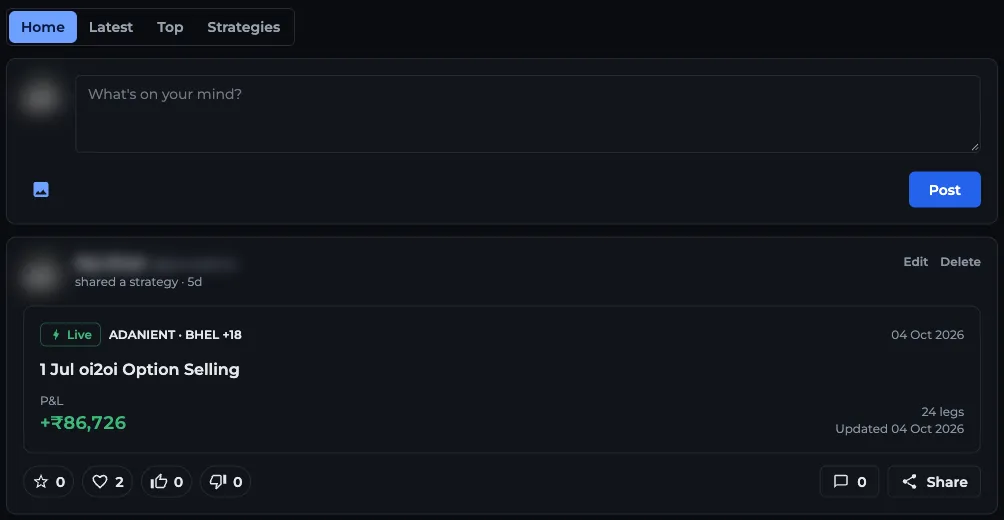
- 1Feeds: Home, Latest, Top, Strategies
- 2Type in What's on your mind?
- 3Add up to 4 images
- 4Post publishes it to the feed
- 5Shared strategy card with its P&L
How do I browse shared strategies?
On /strategies, choose New, Top or Following (strategies from people you follow), then All, Live or Back-test. Back-tests are strategies saved from the Strategy Simulator. The search box filters by symbol, for example NIFTY.
Each strategy page shows the author with their follower count and city, the P&L, Net credit, PoP, Max gain and Max loss, the created and updated dates, the notes and the comments. P&L is reported from the author's saved legs at live prices.
What can I see as a guest, and what needs a login?
Anyone with a strategy link, logged in or not, sees the overview: name, symbols, author, the five figures above, notes and comments. The Positions table with each leg needs you to sign in.
Signed in, you can react with Like, Heart, Thumbs up or Thumbs down, comment (up to 1,000 characters, with replies), follow the author, and share the strategy.
Fork copies the strategy into your own portfolio as Fork of plus its name, so you can open and adjust it in the Strategy Builder. Forking needs Strategy Builder access. See pricing.
How do followers work?
Press Follow on a strategy page or a trader's profile. Their posts then show in your Home feed and their strategies in the Following feed. The Followers page lists your Followers and the traders you are Following, with a follow button on each.
Your public profile, follower count and what others see about you are covered in profile and followers.
Frequently asked questions
Is the AOC Traders Community free?
Reading the community, posting, commenting and following need only a free AOC account. Forking a strategy into your own portfolio needs Strategy Builder access.
Can I see someone's strategy legs without logging in?
No. Guests see the strategy name, P&L, net credit, PoP, max gain and max loss. The positions table with each leg shows only after you sign in.
What is a back-test strategy in the AOC community?
It is a strategy the author saved from the Strategy Simulator, which replays past option chain data. Live strategies come from the Strategy Builder on the live chain.
Can I copy another trader's strategy in AOC?
Yes. Fork on a shared strategy copies it into your Strategy Portfolio, where you can open it in the Strategy Builder and change it. You need Strategy Builder access to fork.
Last updated