Charts and strategies
Strategy Portfolio: Track and Share Saved Strategies
Strategy Portfolio is the AOC page that lists every strategy you saved from the Strategy Builder or Simulator, with its live P&L, max gain and loss and legs. Open it when you are running a few positions at once: reopen one to adjust it, or share it with a public link.
On this page
Who can use the Strategy Portfolio?
Logged-in users with Strategy Builder access, the same add-on as the Strategy Builder and Strategy Simulator. See pricing. P&L and risk figures here are estimates from live quotes, and AOC is not investment advice.
What does the portfolio page show?
At the top, three totals: Total P&L, Active P&L and Archived P&L, each with its strategy count. Below them, the tabs Active, Public and Archived, with the count next to each.
Each row shows the strategy name (with Public or Archived tags), its main symbol and type, the live P&L, Max gain / loss (Unl. means unlimited), Legs as open and closed counts, and when it was Updated. Sort by Last updated, Date created or P&L, and flip ascending or descending with the arrow next to it.
The list refreshes every 10 seconds, and the browser tab shows your portfolio P&L. The refresh button in the app bar reloads it right away.
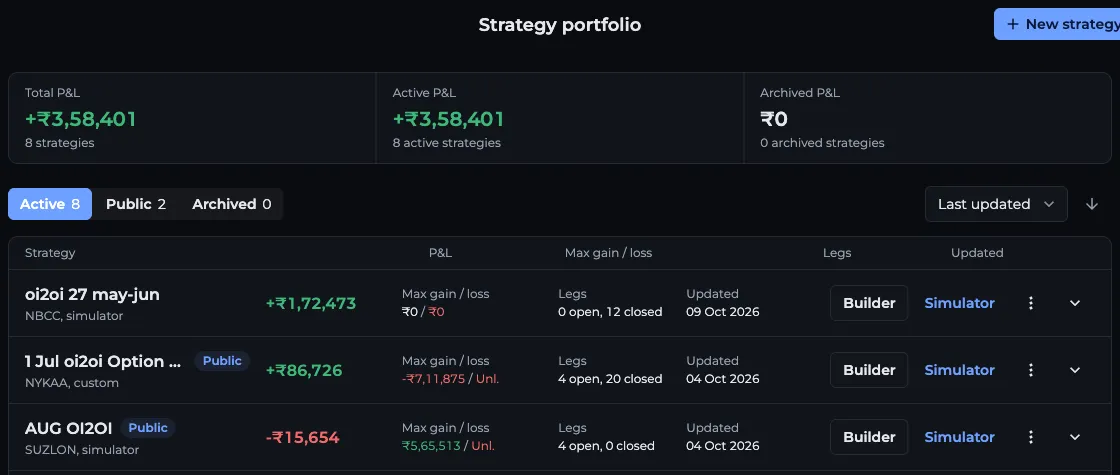
- 1Total, Active and Archived P&L
- 2Active, Public and Archived tabs
- 3Sort by and order
- 4Builder or Simulator opens the strategy
- 5Three-dot menu: Share, Publish, Archive
How do I open, edit or archive a strategy?
Delete is permanent. Archive just moves the strategy to the Archived tab, and you can restore it any time.
- Click the name or the arrow to expand the row. You get the positions table (B/S, Symbol, Expiry, Lots, Entry, Entry At, Exit/LTP, Exit At, P&L, Delta, Status), a search box to filter legs by stock, the notes and the created date.
- Builder opens the strategy in the Strategy Builder with its legs. Simulator opens it in the Strategy Simulator at its entry time.
- The three-dot menu has Share, Open guest view, Publish to community (or Remove from community), Rename or edit notes, Archive (or Restore to active) and Delete.
- Rename or edit notes also has a Status field: Open, Closed or Archived.
How do I share a strategy with a link?
The link opens the strategy's page at /strategies/ followed by its id. Anyone with it sees the name, P&L, net credit, PoP and max gain and loss. The legs show only to people who are signed in. Open guest view shows you that page as others see it.
- Open the three-dot menu on the strategy and press Share (or use the share icon in the Builder after saving).
- Add a Description if the strategy has no notes yet, and press Save description.
- Turn on Public if you also want it listed in the community. Leave it off to share by link only. If it is off, AOC asks once whether to make it public before you share.
- Press Copy for the link, share straight to WhatsApp, X, Telegram, LinkedIn or Facebook, or download the poster image.
What changes when I publish to the community?
Publish to community asks for a name and description, then lists the strategy in the traders community feed and on your profile, with your name, photo, city and social links. Other members can react, comment and fork a copy into their own portfolio.
Published strategies show in the Public tab. Remove from community takes it out of the feed again.
How do I add a new strategy?
Press New strategy in the app bar. It opens the Strategy Builder, where you build the legs and press Save. Simulations are saved from the Strategy Simulator the same way. Both land in this list.
Frequently asked questions
Can I share an option strategy from AOC with someone who does not use AOC?
Yes. Share gives you a link and a poster image. Anyone can open the link and see the name, P&L, PoP and max gain and loss. The individual legs show only after they sign in.
What is the difference between Share and Publish to community?
Share gives a link that works for anyone who has it. Publish to community also lists the strategy in the AOC traders community feed and on your profile, where members can react, comment and fork it.
Is the P&L in Strategy Portfolio live?
Yes. Open legs are priced with live quotes and the list refreshes every 10 seconds. Exited legs keep the exit price you recorded.
Can I get a deleted strategy back?
No, delete is permanent. Use Archive if you only want it out of the Active list. Archived strategies can be restored any time.
Last updated