Market data
Stock Notes: Private Trading Notes for Any Symbol
Stock Notes in AOC are private notes you keep per symbol, one note for NIFTY, one for RELIANCE and so on, shown with the live price. Write down your levels, the setup you are waiting for and the trade plan. The same note follows you onto the option chain and into the strategy builder.
On this page
How do I create a stock note?
- Open Stock Notes from the side menu.
- Tap New note and pick a symbol. Symbols that already have a note show an Open note badge.
- Write in the editor: levels, setup, risks, the trade plan. A counter shows how much of the 20,000 character limit you have used.
- Leave it. Unsaved text is saved automatically every 10 seconds, and Done saves before closing. Save saves without closing.
What does the Stock Notes page show?
Each note is a card with the symbol, the stock name, the live price with its change, the first four lines of your note and the time it was last updated. Prices refresh every 10 seconds.
The candlestick button on a card opens that symbol's live option chain. The delete button asks for confirmation, and a deleted note cannot be recovered.
Once you have more than one note, a Search notes box appears. It searches the symbol, the stock name and the text of your notes, so searching "breakout" finds every note where you wrote it.
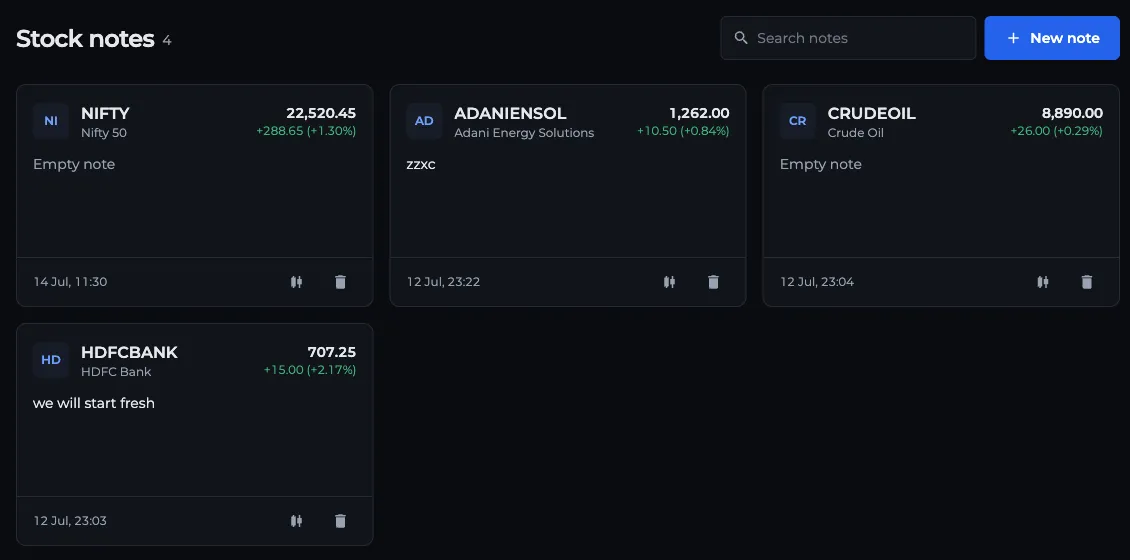
- 1New note: pick a symbol
- 2Search notes by symbol or text
- 3Note card with live price
- 4Open the option chain
- 5Delete the note
How do I tell if my note is saved?
The line under the editor tells you: Unsaved · autosaves while you are typing, Saving… during the save, and Saved with the time once it is stored. If a save fails, the error shows in the same place and your text stays in the box.
Can I see my note on the option chain?
Yes, with the sticky note. Turn on Sticky stock notes under the Option chain section of Settings. It is off by default.
A round yellow note button then appears on the live option chain. Tap it to open the note for the symbol on screen. You can drag the button and the note anywhere, resize the note from its corner, and minimise it with the arrow in its header. Both remember their position in this browser.
It is the same note as on the Stock Notes page. If the symbol has no note yet, opening the sticky note creates one. It autosaves every 10 seconds and again when you minimise it or switch symbol.
Do notes show up in strategies?
Yes. In the strategy builder and the strategy simulator, the Notes tab lists Position notes for every symbol in the strategy, using the same stock notes. You can create, edit and delete them from there.
Who can see my notes?
Only you. Notes are tied to your account, need a login, and are not shared with followers or the community. They sync across devices because they are stored with your account, not in the browser. Stock Notes have no plan requirement.
Frequently asked questions
Can I keep more than one note for the same stock?
No. AOC keeps one note per symbol. Picking a symbol that already has a note opens the existing one, so all your thoughts on that stock stay in one place.
How long can a stock note be?
Up to 20,000 characters. The editor shows a live counter next to the save status.
How do I show a sticky note on the option chain?
Go to Settings, Option chain, and turn on Sticky stock notes. A yellow note button appears on the live option chain and opens your note for the symbol you are viewing.
Are stock notes private?
Yes. Notes are linked to your account and only you can see them. They are not posted to the traders community or shown to followers.
Last updated