Account and plans
AOC Live Webinar: Join the Daily Market Session
The AOC Live Webinar is a set of live sessions run by Team AOC where the option chain is read on screen, in real time, and you can ask questions. There are two: a free evening webinar for every signed-in user, and a daily live session during market hours for AOC Pro Max, AOC Ultra and Live Webinar add-on members.
On this page
What sessions are there?
- Free Evening Webinar: Monday to Friday, 7:00 to 8:30 PM IST. Q&A and live MCX analysis. Free for any signed-in account with a verified mobile number.
- Daily Live Session: Monday to Friday during market hours, from 9:30 AM IST till 2:30 or 3:30 PM IST. Live market analysis with the option chain, open to members with webinar access.
Who can join the daily live session?
You need active webinar access. You get it with AOC Pro Max, AOC Ultra, or the Live Webinar add-on on top of any plan. The 7-day free trial also includes it. See Plans and Billing.
Everyone, members included, must have a verified mobile number. Without it the app shows: Please verify your mobile number to join the webinar.
How do I join the daily live session?
You can also join from Profile: under Membership, the Live Webinar row has a Join button whenever your access is active.
- Log in and open the main menu. Tap Live Webinar (the row with the red LIVE tag).
- In the dialog, find Daily Live Session. The status line shows Active until a date with the days left, or why you have no access.
- Tap Join session. The button shows Generating link while AOC fetches your personal link.
- The session opens in a new browser tab. If your browser blocks the tab, a Link ready link appears under the button; tap it.
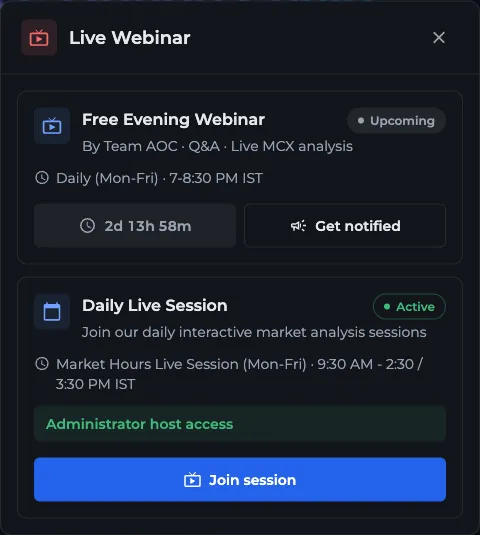
Members see Active until a date and the days left in the status line.
- 1Free Evening Webinar card
- 2Get notified on WhatsApp
- 3Daily Live Session access status
- 4Join session opens a new tab
Can I press Join outside market hours?
Yes. The Join session button works any time your access is active; the app does not lock it by the clock. The team is live only during the session hours, though, so joining at 6 PM just puts you in an empty room.
The evening webinar is different. Its Join webinar button appears 15 minutes before 7 PM IST and stays till 8:30 PM. The rest of the time you see a countdown to the next session instead.
How do I join the free evening webinar?
Open Live Webinar from the main menu and use the Free Evening Webinar card at the top, or use the same card on the home page. Tap Join webinar when it appears.
Tap Get notified to open AOC support on WhatsApp if you want a reminder before sessions.
What if my access has expired?
The status line turns red with Expired on and the date, and the button changes to Recharge. If you never had access it reads Subscribe now.
Either button opens an upgrade box right in the dialog with the Live Webinar add-on (if you have an active plan) and the plans that include the webinar. After payment, the dialog refreshes and Join session comes back. You will get a reminder notification 7, 3 and 1 day before webinar access ends.
How do I get more out of the sessions?
Keep the live option chain open next to the session, so you can follow the strikes being discussed. Note your doubts during the day, for example why the 22,500 PE kept adding OI while NIFTY drifted lower, and bring them to the evening Q&A.
If you are new to the terms, read open interest and support and resistance first. The sessions move fast.
Frequently asked questions
What time is the AOC live webinar?
The free evening webinar runs Monday to Friday, 7:00 to 8:30 PM IST. The daily live session for members runs Monday to Friday during market hours, from 9:30 AM IST till 2:30 or 3:30 PM IST.
Is the AOC webinar free?
The evening webinar is free for any signed-in user with a verified mobile number. The daily live session during market hours needs AOC Pro Max, AOC Ultra or the Live Webinar add-on. The 7-day free trial includes it too.
Why can't I join the AOC webinar?
The usual reason is an unverified mobile number; verify it from Profile, then try again. For the daily session, also check that your webinar access has not expired in the Live Webinar dialog. If the new tab does not open, use the Link ready link your browser left on the page.
Does the AOC Pro plan include the live webinar?
No. AOC Pro covers live data and screeners only. Add the Live Webinar add-on to your Pro plan, or choose Pro Max or Ultra, which include it.
Last updated